
CRO Audit Checklist: 10 Checks to Find Where Your Site Loses Leads
A 10-point CRO audit checklist: tracking, funnel drop-off, message match, speed, mobile, forms, offer, trust and lead follow up, plus how to rank the fixes.
Quick Answer
A CRO audit is a structured review of why visitors who reach your site do not become leads or customers. Work through ten checks in order: tracking, funnel drop-off, message match, page speed, mobile, forms, offer, trust, visitor evidence and lead follow up. Fix confirmed problems right away, turn uncertain ones into tests, and rank everything by the revenue at risk.
Most websites do not have a traffic problem as much as a leak problem. Paid clicks, organic visits and email traffic arrive, and most of them leave without calling, booking or buying. Before spending more to bring people in, it is usually cheaper to find out where the ones you already paid for are getting lost.
A conversion rate optimization (CRO) audit does that. Unbounce's 2024 Conversion Benchmark Report, built on more than 57 million landing page conversions, put the median conversion rate across all industries at 6.6%, with industry medians ranging from 3.8% to 12.3% (Unbounce, Conversion Benchmark Report 2024). Wherever your pages sit in that range, a structured audit shows which fixes are worth making first.
This checklist covers the ten checks we run, in the order we run them, plus the marketFX Path, Proof, Priority Method™ we use to turn findings into a plan. If you would rather hand the work to a team, see our conversion rate optimization services.
What Is a CRO Audit?
A CRO audit is a review of your website, landing pages and lead handling that finds where visitors drop out of the path to a lead or sale, explains why, and ranks the fixes by how much revenue they are likely to recover. It is a diagnosis, not a redesign. The output is a prioritized list of fixes and tests backed by evidence.
A good audit looks at four kinds of evidence together:
- Numbers. Analytics, funnel reports and CRM data that show where people leave.
- Behavior. Session recordings, heatmaps and form analytics that show what they did before leaving.
- Voice of the customer. Polls, surveys and sales calls that explain what stopped them.
- Expert review. A structured walk through each page against clear criteria for clarity, relevance, friction and trust.
Any one of these on its own can mislead. Analytics shows where a problem is but not why. Recordings show behavior but not motive. Opinions about design are cheap. Together, they point to fixes you can defend.
The 10-Point CRO Audit Checklist at a Glance
The ten checks below run in order because each depends on the one before it. There is no point diagnosing a form if the form's conversions are not being tracked correctly.
| # | Check | What to look at | Red flag |
|---|---|---|---|
| 1 | Tracking | Conversions in analytics against the CRM or order system | Counts that do not match, double firing, spam counted as leads |
| 2 | Funnel drop-off | Each step from landing to lead, by device and traffic source | One step losing far more people than the rest |
| 3 | Message match | The ad, email or search that sent the visitor against the page headline | A page that does not repeat the promise that earned the click |
| 4 | Page speed | Core Web Vitals on the highest traffic templates | Largest Contentful Paint above 2.5 seconds on mobile |
| 5 | Mobile experience | The full path on a real phone | Hidden calls to action, broken menus, pop-ups covering the form |
| 6 | Forms | Fields, errors and abandonment by field | Fields that are not needed yet, unclear error messages |
| 7 | Offer and next step | What the visitor gets and what happens after they act | Vague calls to action and no clear reason to act now |
| 8 | Trust | Proof, contact details and policies near the ask | Claims with no evidence, no way to reach a person |
| 9 | Visitor evidence | Recordings, heatmaps, polls and customer interviews | Repeated rage clicks, dead ends and the same objection in every poll |
| 10 | Lead follow up | Time from form submit to first human contact | Leads waiting hours or days, or going to an unmonitored inbox |
1. Is Your Conversion Tracking Accurate?
Start with tracking, because every other finding depends on it. Compare the conversions your analytics and ad platforms report with what actually arrived in your CRM, inbox or order system over the same period. If the numbers do not reconcile within a small margin, fix that before you diagnose anything else.
What to check:
- Every primary conversion fires once. Form submits, calls, bookings and purchases each count one time, on the right step, on every device.
- Funnel steps are tracked as events. You need to see each step, not just the final thank-you page.
- Spam and internal traffic are excluded. Test submissions, bots and staff visits inflate both traffic and conversions.
- Campaign tags are consistent. UTM parameters that follow one naming pattern are the only way to trust results by source.
Our guide to why your Google Analytics dashboard is lying to you covers the most common tracking gaps in detail.
2. Where in the Funnel Do Visitors Drop Off?
Find the step that loses the most people, then split it by device, traffic source and new versus returning visitors. The biggest leak is usually concentrated in one segment, such as mobile visitors from paid social, rather than spread evenly.
Build a simple funnel for each main path: landing page, the next key page, the form or checkout start, and the completed conversion. Then estimate the value at each step. A step that loses 70% of visitors on a page that gets 200 visits a month may matter less than a step that loses 30% on a page that gets 20,000.
Rank the leaks by value, not by percentage. That ranking decides where the rest of the audit spends its time.
3. Does Each Page Match the Ad, Email or Search That Sent the Visitor?
The headline a visitor sees should repeat the promise that earned the click. When someone clicks an ad for emergency HVAC repair and lands on a general home services page, many will leave before they read the second line.
Check your top landing pages against the ads, emails and search queries that send traffic to them:
- Does the headline use the same words and the same offer?
- Is the service, location or product the visitor asked for visible above the fold?
- Does each campaign have a page built for it, or does everything go to the home page?
The channel matters too. In Unbounce's 2024 data, visitors arriving from email converted at 19.3% on average, ahead of paid social at 12% and paid search at 10.9%. Email traffic usually arrives warmer, so it often converts best, and paid traffic needs pages that do more of the persuading.
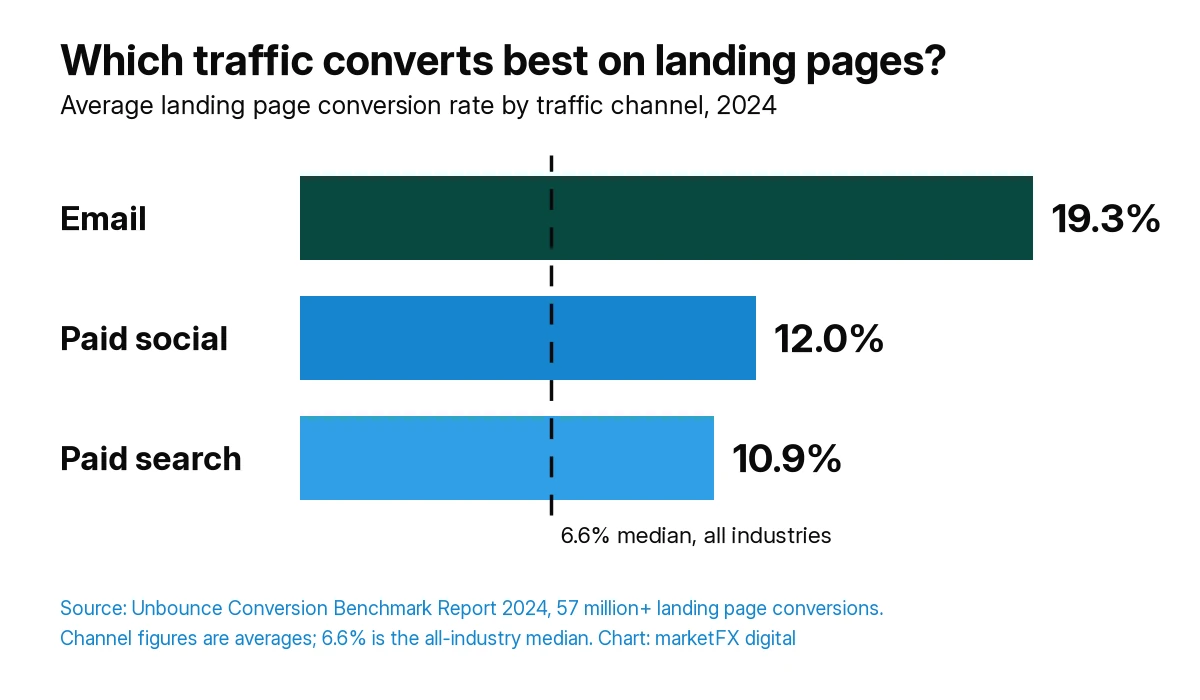
| Traffic channel | Average conversion rate |
|---|---|
| 19.3% | |
| Paid social | 12.0% |
| Paid search | 10.9% |
Source: Unbounce, Conversion Benchmark Report 2024, based on more than 57 million landing page conversions. Channel figures are averages; the 6.6% all-industry figure is a median. Your own numbers depend on your offer, audience and what counts as a conversion.
If email is driving your best traffic, it is worth getting the most from it. Our email marketing agency page explains how we run it.
4. How Fast Do Your Key Pages Load on Mobile?
Check Core Web Vitals on the templates that get the most traffic, starting with landing pages and service pages. Google's guidance treats a Largest Contentful Paint of 2.5 seconds or less, an Interaction to Next Paint of 200 milliseconds or less and a Cumulative Layout Shift of 0.1 or less as good (web.dev, Web Vitals).
Speed is not only a ranking factor. It changes revenue. In a test published by Google's web.dev team, Vodafone improved Largest Contentful Paint by 31% and saw 8% more sales (web.dev, Vodafone case study). That is one company's result, not a promise, but it shows why speed belongs in a conversion audit and not only in a technical one.
Common causes on lead generation sites are oversized hero images, heavy chat and tracking scripts, and page builders that load everything on every page. Our technical SEO services guide covers how to fix them without breaking tracking.
5. Is the Mobile Experience as Good as Desktop?
Walk the full conversion path on a real phone, then compare mobile and desktop conversion rates for the same pages. In Unbounce's 2024 sample, 83% of landing page visits came from mobile devices, while desktop converted 8% better. For most sites, mobile is where most visitors are and where most of the leak is.
What to check on a phone:
- Is the call to action visible without scrolling far, and big enough to tap?
- Do pop-ups, cookie banners or chat widgets cover the form?
- Does the phone number dial when tapped?
- Does the keyboard match the field, such as a number pad for phone numbers?
- Can someone finish the form with one thumb?
6. Do Your Forms Ask Only for What You Need?
Count the fields and ask whether each one is needed at this stage. Every extra field is one more reason to stop, and long forms on a first contact often ask for information sales could collect on the call.
Look at:
- Field count and order. Ask for the easiest information first.
- Required fields. Mark only what is truly required.
- Error messages. They should say what went wrong and how to fix it, next to the field.
- Field abandonment. Form analytics show which field people stop on.
- Confirmation. The visitor should know their request arrived and what happens next.
A short form is not always better. For high value services, one or two qualifying questions can improve lead quality enough to justify a slightly lower conversion rate. Judge forms on qualified leads, not raw submissions.
7. Is the Offer Clear, and Is the Next Step Obvious?
Within a few seconds of landing, a visitor should know what you offer, who it is for, why it is different and what to do next. If any of those are unclear, people leave to compare alternatives and many do not come back.
Read each key page as a first-time visitor and check:
- The value proposition. Is it specific, or could any competitor say the same thing?
- One primary call to action. Too many options slow people down.
- What happens after the click. A call, a quote, a booking: say which, and how long it takes.
- Pricing clarity. If you do not publish prices, explain how pricing works so it does not feel hidden.
8. Do Trust Signals Sit Next to the Ask?
Put proof where the decision happens, next to the form or the call to action, not on a separate page visitors may never reach. Reviews, recognizable client types, certifications, guarantees you actually offer and a real address or phone number all reduce the risk a visitor feels.
Only use proof you can back up. Invented numbers or reviews can do more harm than having none, and visitors increasingly check. Check also that your privacy policy, contact details and response time promises are easy to find on high-intent pages.
9. What Do Recordings, Heatmaps and Real Customers Say?
Use behavior and customer feedback to explain the leaks you found in steps 2 to 8. Watch session recordings of visitors who dropped out on your leakiest page, review heatmaps for ignored content and elements people click that are not links, and run a one-question poll on the page that loses the most people.
Then ask the people who already chose you. A short survey of recent customers asking what nearly stopped them, and what else they considered, often finds the objection your page never answers. Sales and front desk teams hear the same questions every week. Ask them which ones come up most.
Free tools cover most of this. Google Analytics 4 and Search Console show the numbers, PageSpeed Insights shows speed, and tools such as Microsoft Clarity provide recordings and heatmaps.
10. How Fast Are Leads Followed Up?
A conversion only becomes revenue if someone follows it up quickly. Submit a test lead through every form and time how long it takes to reach a person, where it lands in the CRM and who is alerted.
Speed matters. In a study of 1.25 million online sales leads at 42 US companies, firms that tried to contact a lead within an hour were nearly seven times as likely to qualify it, meaning to have a meaningful conversation with a decision maker, as firms that tried even an hour later (Harvard Business Review, The Short Life of Online Sales Leads, March 2011). The study is older and measured qualification, not sales, but the direction is clear.
Many CRO audits stop at the form. Ours follows the lead into the CRM, because a site that converts well into a slow sales process still loses the customer. Our CRM and marketing automation work covers routing, alerts and follow up sequences.
The marketFX Path, Proof, Priority Method™
The marketFX Path, Proof, Priority Method™ is the three-stage way we turn the ten checks into a plan. Path confirms the numbers and maps where people leave. Proof explains why with evidence. Priority ranks every finding by value at risk and effort, and sorts it into ship now, test or research.
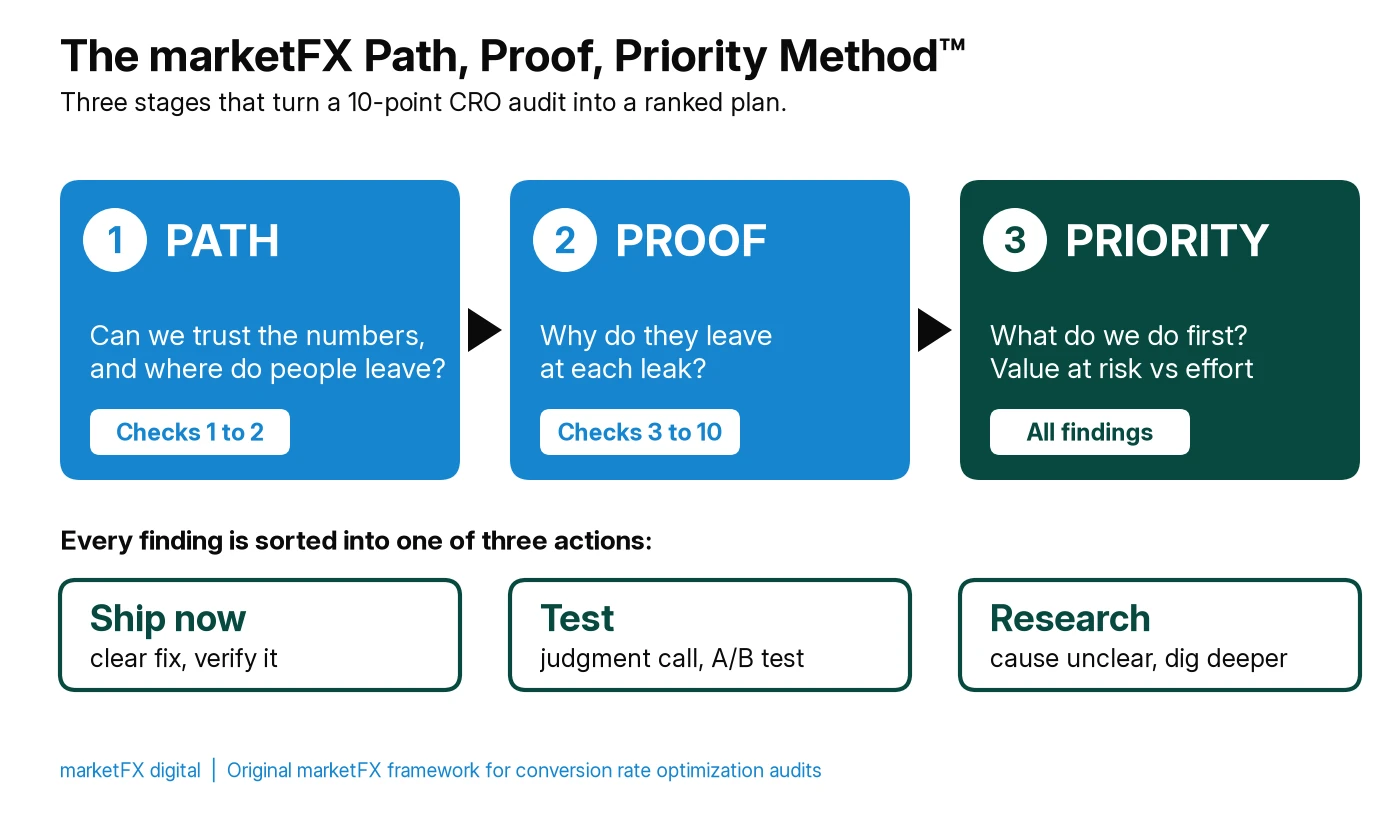
| Stage | Question it answers | Checks | Output |
|---|---|---|---|
| 1. Path | Can we trust the numbers, and where do people leave? | 1 Tracking, 2 Funnel drop-off | Reconciled conversions and a ranked list of leaks by value |
| 2. Proof | Why do they leave at each leak? | 3 Message match to 10 Lead follow up | Findings with evidence attached: data, recordings, polls or page review |
| 3. Priority | What do we do first? | All findings | Each finding scored on value at risk and effort, then sorted into ship now, test or research |
How the Priority stage sorts findings:
- Ship now. Clear problems with an obvious fix, such as a broken form field, a slow hero image or a phone number that does not dial. Fix and verify.
- Test. Likely problems where the fix is a judgment call, such as a new headline, a shorter form or a different offer. Run an A/B test or a before and after comparison with enough traffic to read.
- Research. Leaks with no clear cause yet. Gather more recordings, polls or customer interviews before changing anything.
Attribution: the marketFX Path, Proof, Priority Method™ is an original marketFX framework for conversion audits. It is not a vendor ranking.
How Is a CRO Audit Different From A/B Testing?
A CRO audit decides what is worth testing. A/B testing proves whether a specific change works. Testing without an audit tends to produce small tests on button colors. An audit without testing produces opinions that never get proven.
A/B tests also need traffic. Pages with only a few conversions a month cannot reach a reliable result quickly, so on lower traffic sites more findings go straight to ship now, with a before and after comparison, and fewer go to formal tests.
What Should a CRO Audit Deliverable Include?
A useful CRO audit ends with a plan someone can act on Monday, not a long list of observations. Ask for:
- Confirmation that tracking reconciles with the CRM, or a list of what must be fixed first.
- A funnel map with the biggest leaks ranked by value.
- Each finding with its evidence, the page it affects and a recommended fix.
- A priority score and a ship now, test or research label for every finding.
- A 90-day plan of fixes and tests, with how each will be measured.
When Should You Hire CRO Audit Services?
Hire outside help when traffic is growing but leads are not, when paid media costs keep rising while conversion rates stay flat, or when nobody on the team owns the path from click to closed deal. An outside audit is also useful before a redesign, so the new site fixes the real problems instead of moving them.
Doing it in-house works when you have clean tracking, someone who can read analytics and recordings, and a developer who can ship fixes. Many teams start in-house with this checklist and bring in help for tracking, testing or the CRM side.
If your ad budget is the main source of traffic, pair the audit with a review of the campaigns themselves. Our guide to PPC management services explains what that should cover.
How marketFX Runs CRO Audits
We run CRO audits as part of one team that also runs paid media, SEO, content, CRM and analytics, so findings do not stop at the page. If the leak is a mismatched ad, the paid media team fixes the ad. If the leak is slow follow up, the CRM team fixes the routing. Every audit starts by reconciling tracking with your CRM, uses the Path, Proof, Priority Method™ to rank findings, and ends with a 90-day roadmap of fixes and tests. Across managed paid media portfolios, marketFX reported an average 4.1x ROAS in 2025, and across our client work we report 94% client retention, more than 20 years driving growth and more than $20 million in revenue tracked.
For a wider review that covers search, paid media and tracking alongside conversion, see our marketing audit services.
Related services
FAQs
Frequently Asked Questions
- What is a CRO audit?
- A CRO audit is a structured review of a website, its landing pages and its lead handling that finds where visitors drop out before becoming leads or customers, explains why with evidence, and ranks the fixes by the revenue they are likely to recover. It produces a prioritized plan of fixes and tests, not a redesign.
- What should a CRO audit checklist include?
- A complete checklist covers tracking accuracy, funnel drop-off, message match between ads and pages, page speed, the mobile experience, forms, the offer and call to action, trust signals, visitor evidence such as recordings and polls, and how fast leads are followed up after they convert.
- How long does a CRO audit take?
- A focused audit of a lead generation site usually takes a few weeks, depending on how many templates and funnels it covers and whether tracking must be fixed first. Recordings, heatmaps and polls need time to collect enough data, so plan for at least one to two weeks of behavior data.
- What is a good website conversion rate?
- It depends on the industry, the offer and what counts as a conversion. Unbounce's 2024 benchmark put the median landing page conversion rate across all industries at 6.6%, with industry medians from 3.8% to 12.3%. Compare your pages with your own history and your industry rather than a single number.
- What tools do you need for a CRO audit?
- Most audits can start with free tools: Google Analytics 4 for funnels, Google Search Console for search landing pages, PageSpeed Insights for speed, and a recording and heatmap tool such as Microsoft Clarity. A CRM report on lead outcomes completes the picture by showing which conversions became revenue.
- How often should you run a CRO audit?
- Run a full audit at least once a year and before any redesign, and a lighter check whenever conversion rates drop, a major campaign launches or the site changes significantly. Ongoing testing between audits keeps improving the pages the audit identified.
- Is a CRO audit worth it for a small business?
- Yes, if the site gets enough traffic to show patterns. Lower traffic sites still benefit from the tracking, speed, mobile, form and follow up checks, which often find clear problems that can be fixed right away without formal A/B testing.