
Analytics
Google Analytics Consulting for GA4 Data Your Team Can Trust
A Google Analytics consultant audits, sets up and fixes Google Analytics 4 so the numbers your team uses are accurate, complete and tied to revenue. marketFX reviews your GA4 property, tags, key events, consent setup and reporting, fixes what is broken, and connects GA4 to your ads platforms and CRM, working alongside your developers, in-house team and other agency partners.
Book a Strategy Call See how it starts
Why GA4 needs more than an install
Google Analytics is the most widely used web analytics tool by a long way. W3Techs finds it on 46.1% of all websites, an 80.9% share of the traffic analysis tools it tracks (W3Techs, November 18, 2026). Because it is so common, many teams assume the numbers are right because the tag is installed. Often they are not.
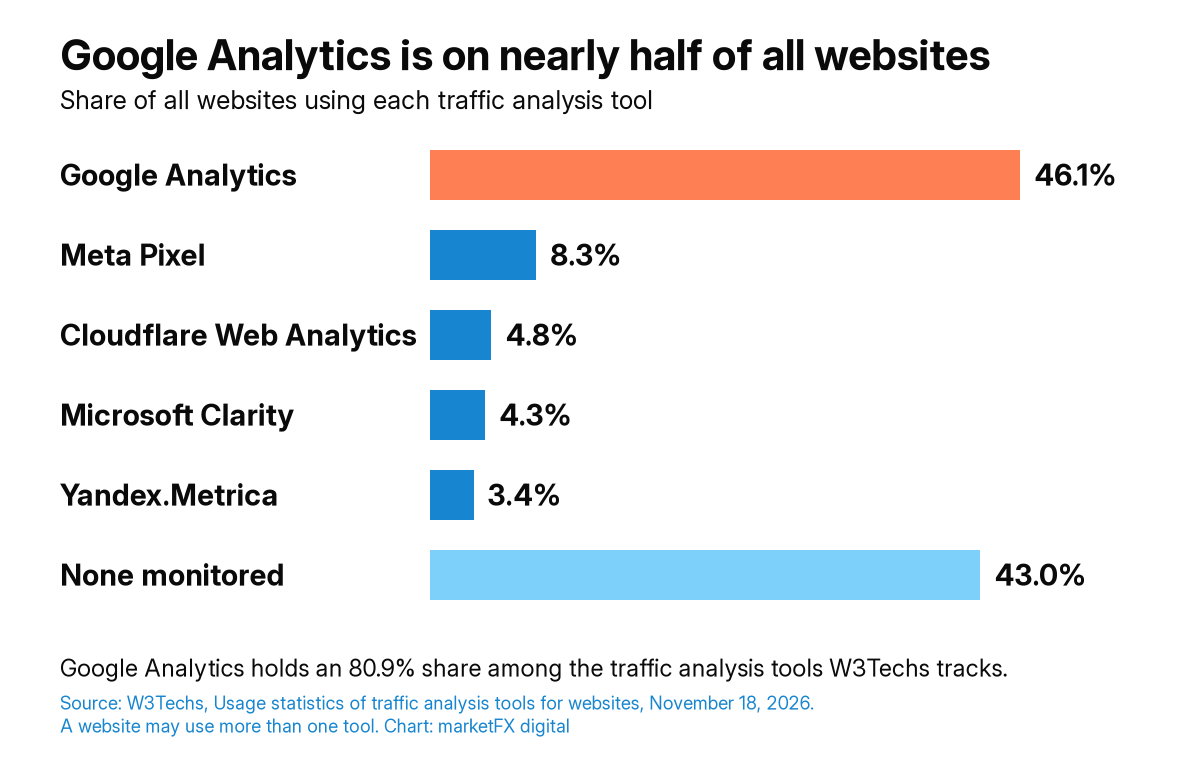
| Tool | Share of all websites |
|---|---|
| Google Analytics | 46.1% |
| Meta Pixel | 8.3% |
| Cloudflare Web Analytics | 4.8% |
| Microsoft Clarity | 4.3% |
| Yandex.Metrica | 3.4% |
| None of the tools W3Techs monitors | 43.0% |
GA4 measures events, not just page views, and it only reports what it is told to collect. Out of the box, it will not know which form submissions are real leads, which purchases were refunded, which visitors declined cookies or which sale closed later in your CRM. Those decisions have to be made, built and tested. When they are not, the result is familiar: GA4, the ad platforms, the CRM and finance all report different numbers, and every meeting starts with an argument about which one is right. Our article on why your Google Analytics dashboard is lying to you explains where the default reports break down.
What a Google Analytics consultant does
A Google Analytics consultant makes GA4 trustworthy and useful. The work usually covers seven areas.
- GA4 audit. A review of property and data stream settings, events, key events, filters, cross-domain tracking, data retention, user access and linked accounts.
- Measurement plan. A written plan of what to track, why it matters to the business and where each metric shows up, agreed with marketing, sales and finance.
- Setup and implementation. Clean Google Tag Manager containers, a consistent event naming scheme, a data layer your developers can maintain and key events that match real business outcomes.
- Consent and privacy settings. Consent mode and cookie banner behavior configured so tracking respects visitor choices and the gaps are understood, not hidden.
- Ads and CRM connections. GA4 linked to Google Ads and other platforms, with conversions deduplicated and offline or CRM outcomes connected where your systems allow.
- Server-side tagging. Where it fits, moving tags to a server container for more durable, first-party data collection. Our server-side tracking services page covers this in detail.
- Reporting and handover. Explorations and dashboards built around decisions, plus documentation and a walkthrough so your team can answer its own questions.
Signs your GA4 setup needs a consultant
You need a GA4 consultant when your team has stopped trusting the numbers, or when nobody can explain how they are produced. Common signs include:
- GA4 conversions and your CRM or order system disagree by more than you can explain.
- Key events fire twice, fire on the wrong pages or include test and spam activity.
- Paid media platforms claim more conversions than your business actually received.
- Traffic shows up as direct or unassigned because campaign tagging is inconsistent.
- Several people have edited the property and tag container over the years, with no record of why.
- Reports stop at sessions and clicks, so leadership cannot see leads, revenue or cost per customer.
- You are moving to a new website, platform or checkout and need tracking to survive the change.
The marketFX Clean Data Path™
The marketFX Clean Data Path™ is the five-step method we use for GA4 work: Audit, Plan, Build, Validate and Report. It fixes the foundation before anything is built on top of it, so dashboards and budget decisions rest on data you can defend.
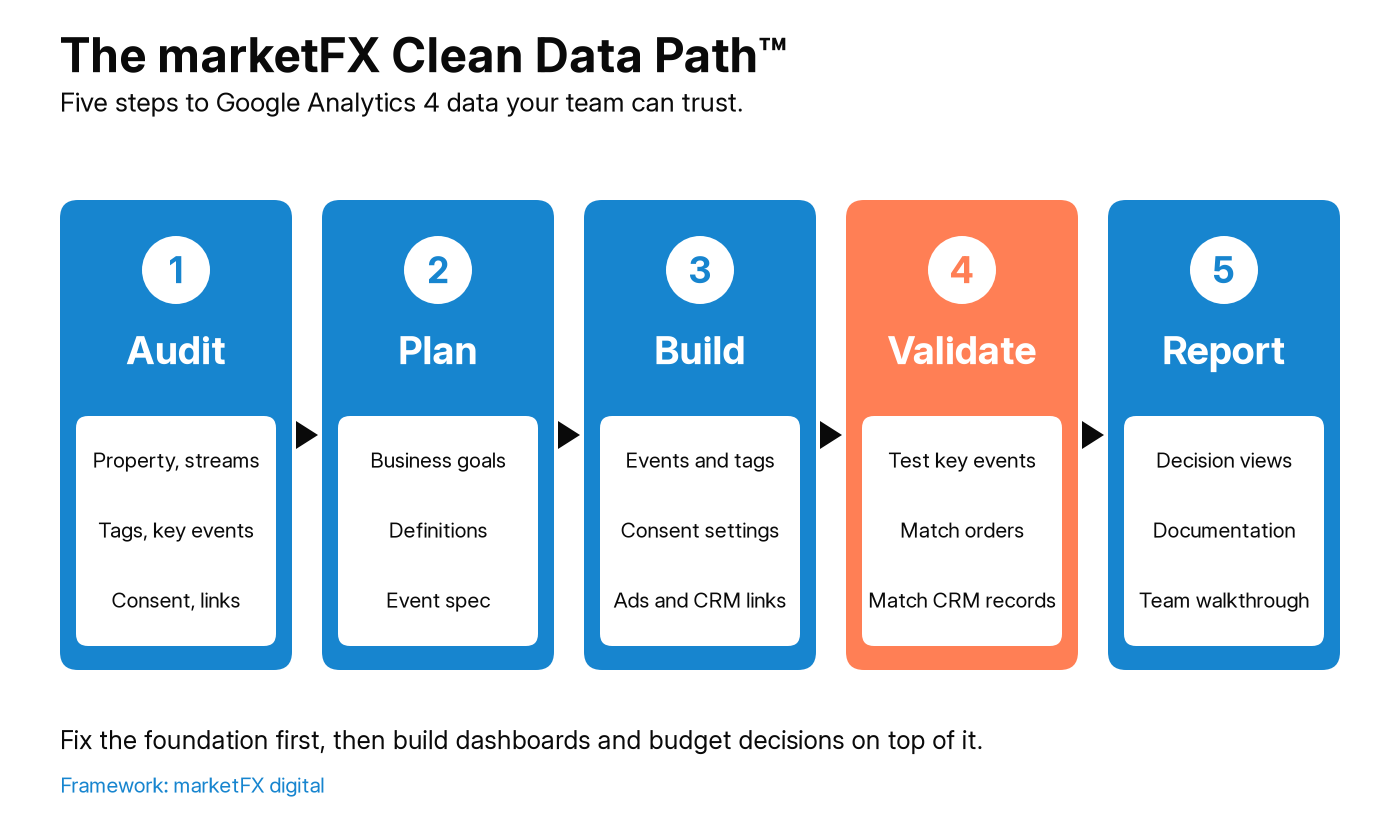
| Step | What we do | What you get |
|---|---|---|
| 1. Audit | Review the GA4 property, data streams, tags, key events, consent setup, filters and linked accounts | A written list of what is broken, missing or duplicated, ranked by impact |
| 2. Plan | Agree business goals, definitions for leads, customers and revenue, and the events that represent them | A measurement plan and event specification your developers can follow |
| 3. Build | Implement events, Tag Manager changes, consent settings, ads links and CRM connections | A clean, documented setup with clear owners |
| 4. Validate | Test every key event and compare GA4 totals with orders, leads and CRM records | Known, documented gaps instead of hidden ones |
| 5. Report | Build explorations and dashboards around the decisions your team makes, then walk your team through them | Reports leadership uses, and a team that can answer its own questions |
GA4 limits that shape your setup
Standard GA4 properties have limits that affect how you plan tracking. Google documents them in its configuration limits and data retention help pages, and they are easy to hit when several teams add events and dimensions over time.
| Item | Limit per standard property | Why it matters |
|---|---|---|
| Key events | 30 | Reserve them for outcomes that matter to the business, not every click |
| Event-scoped custom dimensions | 50 | A naming plan stops teams from using them up on one-off needs |
| User-scoped custom dimensions | 25 | Choose user attributes carefully and avoid personal data |
| Audiences | 100 | Old remarketing audiences pile up unless someone archives them |
| User and event data retention | 2 or 14 months | Retention affects explorations and funnel reports, so set it before you need history |
Sources: Google Analytics Help, GA4 configuration limits and Google Analytics Help, Data retention. Google Analytics 360 properties have higher limits.
Google Analytics consultant, analytics agency or in-house analyst
The right choice depends on how much of the work you need done and how much your team can own afterwards. Many companies use a consultant to fix the foundation and then keep reporting in house.
| Option | Best for | Trade-off |
|---|---|---|
| Google Analytics consultant | Audits, fixes, migrations and a clean setup your team can maintain | Works best when someone in house owns the data afterwards |
| Marketing analytics agency | Ongoing reporting, attribution and dashboards across every channel | Broader scope and ongoing cost; GA4 is one part of the work |
| In-house analyst | Day-to-day questions, reporting and quick changes | Hard to hire for every skill, from tagging to consent to CRM data |
marketFX can do either of the first two. If you need wider measurement design, KPI frameworks and executive reporting, see our marketing analytics consulting and marketing analytics and reporting services. If you are comparing providers, our guide on how to choose a marketing analytics agency lists the questions to ask.
How GA4 connects to the rest of your marketing
GA4 is only useful when it agrees with the systems around it. We treat it as one part of a connected measurement setup, not a standalone tool.
- Paid media. Clean key events and consistent tagging give paid media teams better signals and help Google Ads and other platforms report closer to reality.
- Attribution. A trusted GA4 setup is the starting point for marketing attribution work that reconciles platform reports with your source of truth.
- SEO and AI search. Landing page and referral data show which pages and AI assistants bring visitors who convert.
- CRM. Connecting leads and sales back to source closes the loop from first visit to revenue.
We work with your developers, your in-house team and your other agency partners, so everyone uses the same definitions and the same numbers.
Every GA4 engagement starts with a free audit
Before we recommend anything, we look at what you have. The free audit reviews your GA4 property, tags, key events and how your marketing numbers line up with your leads and sales. You get a one-page written summary of what we find, plus a 30-minute walkthrough. It is yours to keep, whether or not you work with us.
How marketFX works on Google Analytics
- Free audit. We review your setup and walk you through what we found.
- Scope. We agree what needs fixing first and share pricing in writing after a brief scoping call.
- Fix and build. We implement the plan with your developers or directly in your tools, depending on access and your preference.
- Validate and report. We test the results against real business data, document the setup and hand over reports your team can use.
Get numbers your team can trust
If your team is not sure which numbers to believe, start with the free audit. We will show you what we find in your GA4 setup and what we would fix first.
FAQs
Google Analytics Consulting FAQ
- What does a Google Analytics consultant do?
- A Google Analytics consultant audits your GA4 property and tags, plans what to measure, fixes or rebuilds the setup, connects GA4 to your ads platforms and CRM, tests that the numbers match real business data and builds reports your team can use.
- Do we need GA4 consulting if GA4 is already installed?
- Often, yes. An install only collects default data. Key events, consent settings, cross-domain tracking, campaign tagging and CRM connections all need to be set up and tested, and many properties collect duplicated or missing conversions without anyone noticing.
- How much does Google Analytics consulting cost?
- Cost depends on how many sites, data streams and platforms are involved, how much implementation is needed and whether server-side tagging or CRM connections are in scope. We scope the work after a free audit and share pricing in writing after a brief scoping call.
- Can you work with our developers and current agency?
- Yes. We write specifications your developers can implement, work inside your Google Tag Manager and GA4 accounts, and coordinate with your other agency partners so everyone uses the same events and definitions.
- Do you set up server-side tracking and consent mode?
- Yes. We configure consent mode and cookie banner behavior with your consent platform, and set up server-side tagging where it fits your stack. Our server-side tracking services page explains that work in more detail.
- Can you connect GA4 to our CRM and offline sales?
- Where your systems allow it, yes. Leads, opportunities and offline sales can be connected back to their source through shared identifiers, data imports or server-side events, so marketing reports match the revenue your finance team sees.
- Do you only advise, or do you implement too?
- Both. We can deliver an audit and measurement plan for your team to implement, or we can lead the implementation in GA4, Google Tag Manager and your reporting tools alongside your developers.
Read next
- Server-Side Tracking ServicesServer-side tagging and conversion APIs for more durable tracking.Read more
- Marketing Analytics ConsultingWider measurement design, KPI frameworks and executive reporting.Read more
- Why Your Google Analytics Dashboard Is Lying to YouWhere default GA4 reports mislead budget decisions.Read more