
Website Migration SEO Checklist: 12 Steps to Keep Your Rankings
A 12-step website migration SEO checklist: benchmark, inventory URLs, map 301 redirects, test staging, launch and monitor so a new site keeps its rankings.
Quick Answer
A website migration SEO checklist protects rankings when you change domain, platform, URLs or design. Benchmark traffic and rankings, inventory every URL worth keeping, map each one to its closest new match with a permanent 301 redirect, keep content and metadata intact on staging, then launch, submit sitemaps and monitor Search Console for at least 90 days.
A new website is supposed to grow the business. Too often, the first thing it does is lose search traffic that took years to build. Pages disappear, old links break, metadata gets rewritten, and Google has to work out from scratch which pages matter. None of that is inevitable. Most of the damage comes from steps that were skipped, not from the move itself.
The data shows why it is worth taking seriously. In a study of 892 domain migrations published by Search Engine Journal in January 2025, it took an average of 523 days for the new domain to match the old domain's estimated organic traffic, and 17% had not caught up after 1,000 days (Search Engine Journal, How Long Should an SEO Migration Take?). The fastest recoveries took less than three weeks. The difference is mostly preparation.
This checklist covers the twelve steps we work through on any migration, grouped by the marketFX Map, Mirror, Monitor Method™. If the migration is part of a wider rebuild, our guide to technical SEO services covers the crawl, rendering and indexing work that sits underneath it.
What Counts as a Website Migration in SEO?
A website migration, in SEO terms, is any change that alters how search engines find, crawl or understand your pages: a new domain, a new platform, new URLs, a move to HTTPS, or a redesign that changes templates and content. Some moves change one of these. Many change several at once, which is where most of the risk comes from.
| Migration type | What changes | SEO risk | Extra step to plan for |
|---|---|---|---|
| Domain change or rebrand | Every URL moves to a new domain | High | Change of Address in Search Console, every hostname variant redirected |
| Platform or CMS change | Templates, URL patterns, rendering and plugins | High | Check how the new platform renders content and handles redirects |
| URL structure change | Paths, folders or slugs | Medium to high | A complete one-to-one redirect map |
| Site consolidation or merger | Several sites or sections become one | High | Decide which content survives and where each old page lands |
| Redesign on the same URLs | Templates, navigation, copy and internal links | Medium | Keep content, metadata and internal links that already rank |
| HTTP to HTTPS | Protocol only | Low to medium | Certificates, redirects and canonicals on every page |
| Hosting move | Servers, not URLs | Low | Speed, uptime and server responses during the switch |
Google's own advice is to change one thing at a time where you can. If you plan to move domain, switch platform and redesign, it recommends doing them in sequence rather than all at once, so you can see which change caused any drop (Google Search Central, Site moves with URL changes).
The 12-Step Website Migration SEO Checklist at a Glance
The steps run in order. Each phase depends on the one before it: you cannot map redirects without an inventory, and you cannot monitor a launch without a benchmark to compare against.
| # | Step | Phase | Done when |
|---|---|---|---|
| 1 | Scope the change | Map | Everyone agrees what is changing, when, and what stays the same |
| 2 | Benchmark performance | Map | Traffic, rankings, conversions and a full crawl are saved by page |
| 3 | Inventory every URL | Map | One list of every URL that has traffic, links or conversions |
| 4 | Build the redirect map | Map | Every old URL has a closest match or a deliberate 404 or 410 |
| 5 | Keep on-page signals | Mirror | Titles, headings, copy, schema and links match or improve on the old pages |
| 6 | Protect staging | Mirror | Staging is private, and the launch list for robots and noindex is ready |
| 7 | Update technical signals | Mirror | Canonicals, hreflang, sitemaps and internal links use new URLs |
| 8 | Test crawling and speed | Mirror | Key templates render in HTML and pass Core Web Vitals checks |
| 9 | Test tracking | Mirror | Every conversion fires on staging and reaches the CRM |
| 10 | Launch and verify | Monitor | Redirects live and tested, sitemaps submitted, blocks removed |
| 11 | Monitor 90 days | Monitor | Weekly comparison to the benchmark, issues fixed as they appear |
| 12 | Maintain redirects and links | Monitor | Redirects kept at least a year, key external links updated |
The marketFX Map, Mirror, Monitor Method™
The marketFX Map, Mirror, Monitor Method™ is the three-phase approach we use to plan migrations. Map is everything you learn and decide before anyone builds. Mirror is making sure the new site carries every signal the old one earned. Monitor is the launch and the 90 days after it, when most problems either get caught early or quietly become permanent.
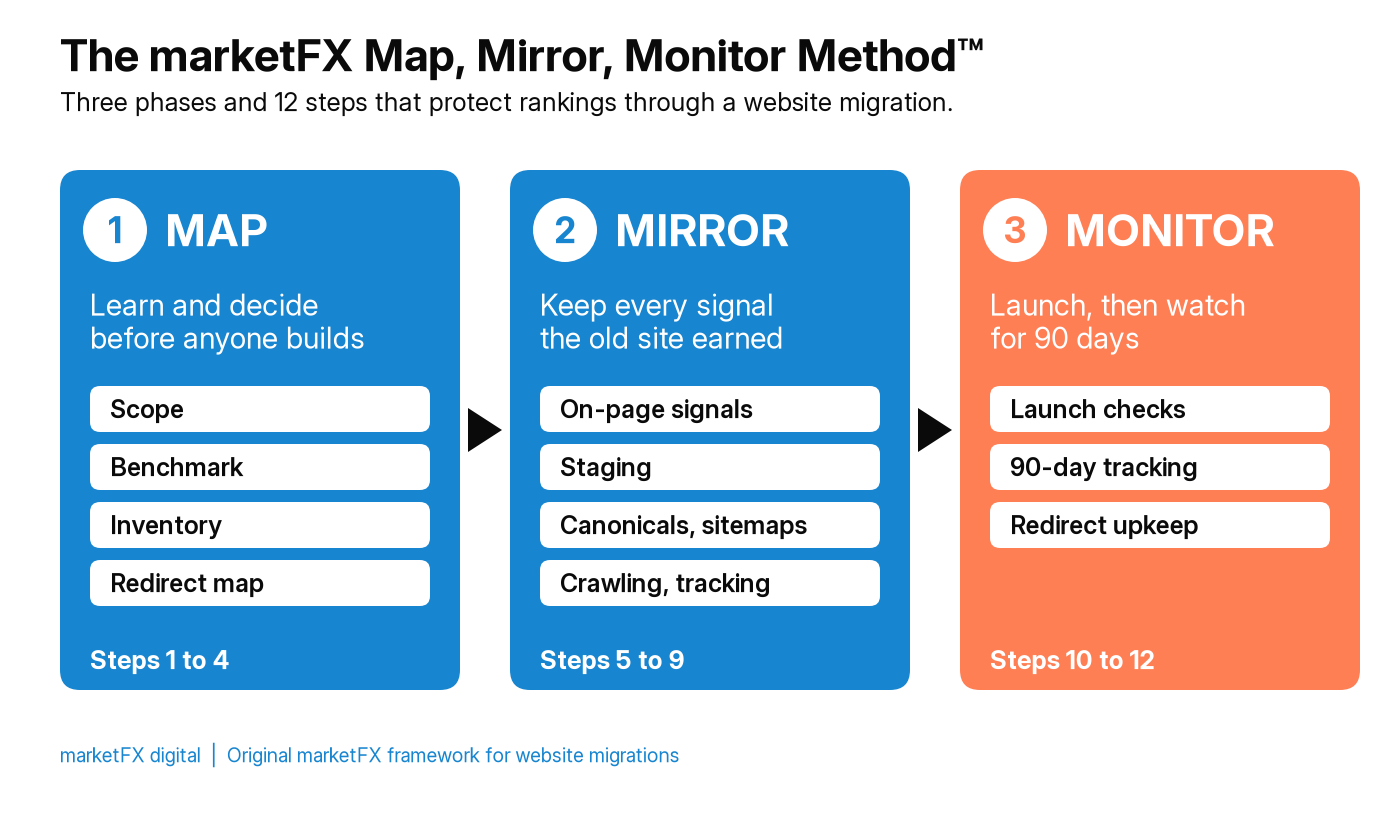
| Phase | Steps | Question it answers | Main output |
|---|---|---|---|
| Map | 1 to 4 | What do we have, and where does each piece go? | Benchmark, URL inventory and redirect map |
| Mirror | 5 to 9 | Does the new site keep everything that earned rankings and leads? | A staging site signed off against the checklist |
| Monitor | 10 to 12 | Did the move work, and what needs fixing now? | Launch log, 90-day tracker and redirect upkeep plan |
1. What Exactly Is Changing, and Can You Change Less at Once?
Write down every change in scope before work starts: domain, platform, URL patterns, navigation, content, templates, hosting and tracking. Then ask which of those can wait. A smaller migration is easier to diagnose and recover from.
Agree on a launch window too. Google suggests timing a move for a period when your traffic is usually lower, and moving large sites in sections where that is possible. Avoid launching just before your busiest season, a major campaign or a holiday when the team is away.
2. Have You Benchmarked Traffic, Rankings and Conversions?
Save a record of how the current site performs before anything changes. Without it, nobody can say after launch whether traffic dropped, by how much, or on which pages.
Export and keep:
- Search Console data for clicks, impressions and queries by page, for at least the last 12 months if you can.
- Analytics data for organic sessions and conversions by landing page.
- Rankings for your most valuable queries.
- A full crawl of the old site with status codes, titles, meta descriptions, headings, canonicals and structured data.
- Backlink data showing which pages other sites link to.
- Core Web Vitals for your main templates.
3. Do You Have a Complete List of URLs Worth Keeping?
Build one inventory of every URL that matters, from several sources, because no single tool sees them all. Combine a full crawl, your XML sitemaps, Search Console and analytics landing pages, pages with backlinks, paid ad landing pages, and URLs used in email templates, printed materials and local listings.
Then rank the list. Pages with organic traffic, conversions or strong links are your priority URLs, and they get checked by hand at every later step. For a deeper look at how we audit large sites, see our enterprise SEO audit guide.
4. Does Every Old URL Redirect to Its Closest New Match?
Map every old URL to the most relevant page on the new site and plan a permanent server-side redirect for each one. Google says 301 and other permanent redirects do not cause a loss in PageRank, so a correct redirect passes on what the old page earned.
Three rules keep the map honest:
- One to one where possible. Each old page should land on its closest equivalent, not on a category page or the home page.
- No mass redirects to the home page. Google warns that sending many old URLs to one irrelevant page can be treated as a soft 404.
- No chains. Point each old URL straight at its final destination, and update older redirects so they do too.
If a page has no sensible replacement, let it return a 404 or 410. That is a better outcome than a misleading redirect.
5. Does the New Site Keep the Content and Signals That Rank?
Compare each priority page on staging with its old version. The page title, meta description, main heading, body copy, images and alt text, structured data and internal links should match the old page or improve on it deliberately. Redesigns often lose rankings because copy is cut to fit a new layout, or because a page that ranked for a dozen questions is replaced by a shorter, prettier one that answers three.
If content is being rewritten, treat it as a separate project with its own review. For how we plan content that serves both search and AI answers, see our SEO content services guide.
6. Is Staging Hidden From Search but Ready to Open?
Keep the staging site out of search results, ideally behind a password, so its pages are not indexed as duplicates. At the same time, prepare a launch list of exactly what must change when you go live: the production robots.txt file, and every page that needs a noindex tag removed.
Google lists leftover noindex tags and robots.txt blocks among the most common migration mistakes. One forgotten line can keep an entire new site out of the index.
7. Do Canonicals, Hreflang, Sitemaps and Internal Links Use the New URLs?
Every new page should carry a self-referencing canonical tag that uses its new URL. If you run multilingual or multi-region pages, update the hreflang annotations to the new URLs. Build a fresh XML sitemap that lists only the canonical new URLs.
Update internal links in navigation, footers, body copy and related content blocks so they point straight at new URLs instead of relying on redirects. Internal links are one of the clearest signals you control, and our glossary entry on internal linking explains why.
8. Can Search Engines and AI Crawlers Read the New Templates?
Check that the main content and links on each template appear in the HTML the server sends, not only after JavaScript runs in a browser. Many AI crawlers do not run JavaScript at all, so a platform that renders everything in the browser can make a site harder for answer engines to read, even if Google eventually renders it.
Test the main templates for speed as well. A new platform can be slower than the old one, and Core Web Vitals problems are easier to fix before launch than after. Our technical SEO services guide covers rendering and crawler access in detail, and our AI search audit explains how to check what answer engines can see.
9. Will Tracking and Conversions Keep Working on Day One?
Test every conversion on staging: form submits, calls, bookings, purchases and chat. Confirm each one fires once, reaches the CRM and is attributed to the right source. Check that your tag manager, analytics, ad platform tags and consent settings come across with the new templates.
This step protects more than SEO. If tracking breaks at launch, you lose the ability to tell a real traffic drop from a measurement gap, and paid campaigns may start optimizing on bad data. Our guide to why your Google Analytics dashboard is lying to you covers the most common tracking gaps.
10. What Has to Happen in the First 24 Hours After Launch?
Turn on the redirects, then test them straight away. Spot-check priority URLs by hand, then test the full map with a crawler or script to confirm every old URL reaches its intended destination in one hop, with no loops or errors.
On launch day:
- Remove staging blocks. Publish the production robots.txt and remove leftover noindex tags.
- Submit the new XML sitemap in Search Console and Bing Webmaster Tools.
- Use Change of Address in Search Console if you moved domain or subdomain.
- Verify every hostname variant. HTTP, HTTPS, www and non-www versions should all resolve to the right place.
- Update paid campaigns so ads point at final URLs rather than redirects.
- Annotate the launch date in your analytics and reporting.
11. How Should You Monitor the First 90 Days?
Watch the site daily for the first week, then weekly for at least 90 days, against the benchmark from step 2. Look at Search Console indexing, crawl errors and 404s, clicks and impressions by page, rankings for priority queries, and conversions by landing page.
Expect some movement. Google says that for medium-sized sites it can take a few weeks or more before the new URLs replace the old ones in results, and longer for large sites. A short dip is normal. A steady decline on priority pages, a rise in 404s or new pages that are not being indexed are signals to act on now rather than wait out.
12. Which Redirects and Links Do You Keep Updating After Launch?
Keep your redirects in place for as long as possible. Google recommends at least one year, so it can recrawl old URLs and move signals such as links from other sites onto the new ones. Many teams keep them permanently.
Then update the links you control or can influence: your Google Business Profile and other local listings, social profiles, directory listings, email templates, partner sites and your most valuable backlinks. A direct link to the new URL is cleaner than one that relies on a redirect forever.
How Long Does SEO Take to Recover After a Website Migration?
Recovery can take anywhere from a few weeks to well over a year, depending on the type of migration, the size of the site and how well it was planned. Domain changes take longest. A well-run move to new URLs on the same domain usually settles much sooner, though no one can promise zero movement.
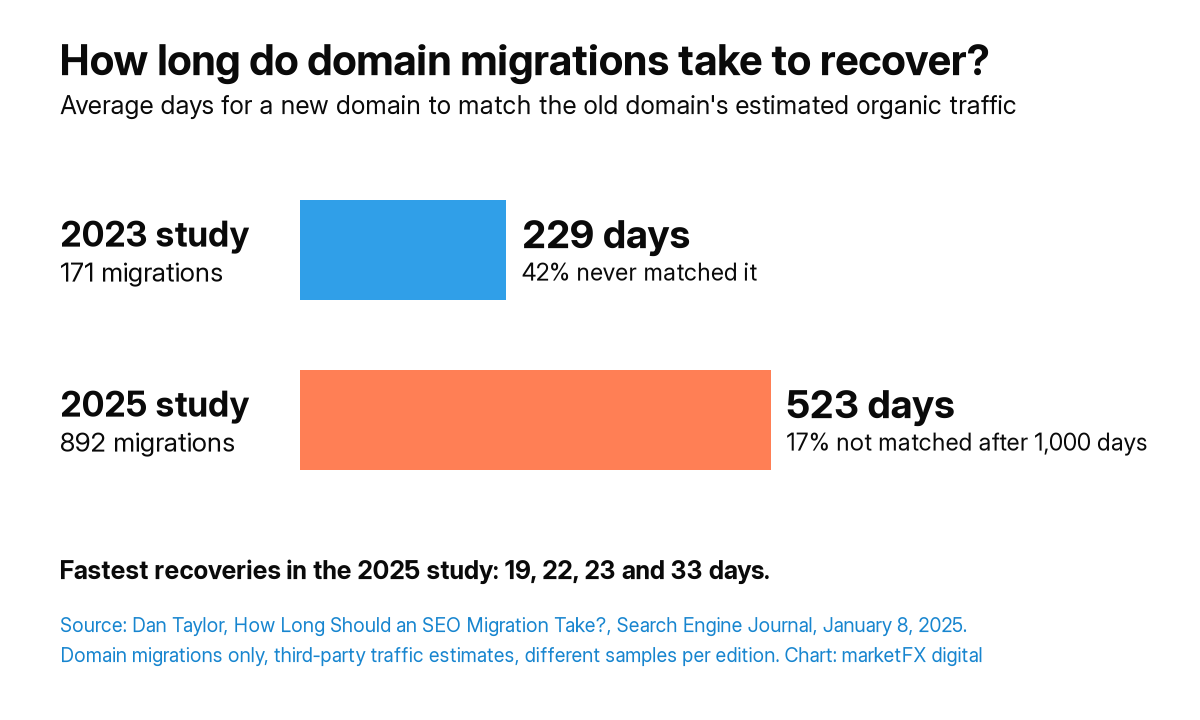
| Study edition | Domain migrations | Average days to match old domain | Share not recovered |
|---|---|---|---|
| 2023 | 171 | 229 | 42% |
| 2025 | 892 | 523 | 17% after 1,000 days |
Source: Dan Taylor, How Long Should an SEO Migration Take? (Study Updated), Search Engine Journal, January 8, 2025. Domain migrations only, measured with third-party traffic estimates, with a sample gathered from SEO professionals. The two editions use different samples, so treat the comparison as directional. Platform moves and redesigns on the same domain are different and usually lower risk.
The study also found that the fastest recoveries took 19, 22, 23 and 33 days. The lesson is not that migrations are doomed. It is that results vary widely, and the steps you control decide which end of that range you land on.
Can You Redesign a Website Without Losing SEO?
Yes. A redesign on the same URLs is one of the lower-risk changes, as long as it keeps what already ranks. Most redesign losses come from three places: copy cut to fit a new design, internal links removed from navigation and body text, and pages merged or deleted without redirects.
Run steps 2, 3 and 5 for any redesign, even if no URLs change. If the redesign also changes URLs or the platform, run the full checklist.
What Are the Most Common Website Migration SEO Mistakes?
The same mistakes show up again and again:
- Redirecting everything to the home page instead of mapping pages one to one.
- Leaving noindex tags or robots.txt blocks from staging in place after launch.
- Missing URLs because the inventory came from one crawl and ignored pages that only have backlinks or ad traffic.
- Redirect chains built on top of redirects from an earlier site.
- Changing everything at once, so nobody can tell which change caused a drop.
- Breaking tracking, so a real drop and a reporting gap look the same.
- Removing redirects too early, often during a hosting or platform clean up a few months later.
When Should You Hire SEO Migration Services?
Bring in outside help when the site has a lot to lose: many pages with organic traffic, a large backlink profile, multiple locations or languages, a domain change, or a platform that renders content differently. It is also worth it when your development team is strong but has not run an SEO-led migration before.
Questions to ask an agency or consultant before you hire them for a migration:
- How will you build the URL inventory, and which sources will you use?
- Who owns the redirect map, and how will you test it before and after launch?
- What will you check on staging, and what has to pass before launch?
- How will you protect tracking and conversions?
- What will you monitor in the first 90 days, and how will you report it?
- What would make you recommend delaying the launch?
Be wary of anyone who promises no traffic movement at all. A good partner sets clear expectations, explains the risks for your type of migration and shows you how they will catch problems early.
How marketFX Approaches Website Migrations
We treat a migration as part of search, not as a launch-day task. That means benchmarking before the build starts, mapping every URL that has traffic, links or conversions, signing off staging against the Map, Mirror, Monitor Method™, and watching the first 90 days against the benchmark. Because one team at marketFX also runs paid media, CRM and analytics, tracking, ad landing pages and lead routing are checked alongside rankings. Across our client work we report 94% client retention, more than 20 years driving growth and more than $20 million in revenue tracked.
If you are planning a new site, our SEO and AI visibility consulting covers search and answer engine visibility together, and our marketing audit services review search, paid media and tracking in one pass.
Related services
FAQs
Frequently Asked Questions
- What is a website migration in SEO?
- A website migration is any change that affects how search engines find, crawl or understand your site, such as a new domain, a new platform or CMS, new URLs, a move to HTTPS or a redesign that changes templates and content. Each type carries different risk, and several changes at once carry the most.
- How long does it take to recover SEO after a migration?
- It varies. Google says medium-sized sites can take a few weeks or more for new URLs to replace old ones, and larger sites longer. In a Search Engine Journal study of 892 domain migrations, the average was 523 days, while the fastest recovered in under three weeks. Planning makes the biggest difference.
- Do 301 redirects lose SEO value?
- Google says 301 and other permanent redirects do not cause a loss in PageRank. Redirects still need to be done well: each old URL should point straight at its closest new match, without chains, and redirects should stay in place for at least a year.
- How long should I keep redirects after a migration?
- Google recommends keeping redirects for as long as possible, generally at least one year, so it can recrawl old URLs and transfer signals such as links. Many sites keep migration redirects permanently because people and other websites keep using old links for years.
- Should I redirect old pages to the home page?
- No. Redirect each old page to its closest relevant new page. Google warns that sending many old URLs to one irrelevant page, such as the home page, can be treated as a soft 404. If a page has no sensible replacement, let it return a 404 or 410.
- Can I change my domain and redesign my site at the same time?
- You can, but Google recommends changing one thing at a time where possible, for example moving domain first and redesigning later. Doing both at once makes it harder to find the cause of any drop and slows recovery if something goes wrong.
- When should I hire an SEO migration agency?
- Consider outside help when the site has significant organic traffic, many pages or backlinks, several locations or languages, a domain change or a platform that renders content differently. A good partner owns the URL inventory, redirect map, staging checks and 90 days of monitoring, and sets realistic expectations.